Functions and Features
Updated at: 2024/10/16
Page Speed Diagnostics
Feature Overview
PulseDX's Page Speed Diagnostics quickly identifies bottlenecks in your Website's loading across different regions globally, providing specific optimization suggestions to ensure optimal performance in every target market, thereby enhancing user experience and local SEO performance.
Easy to Use PulseDX's Page Speed Diagnostics
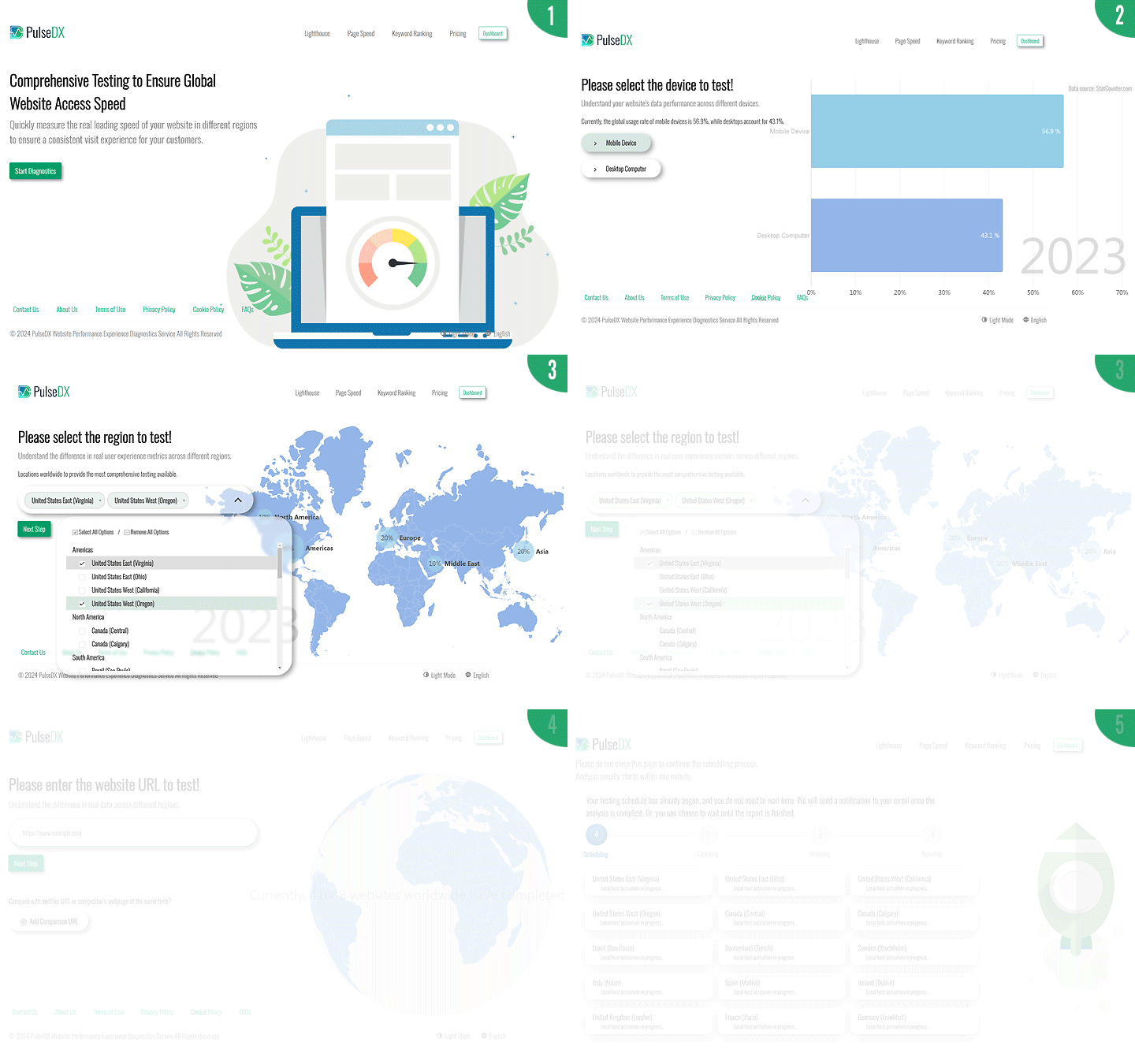
- Log in to the PulseDX.com platform and select "Page Speed Diagnostics".
- Step 1: Choose the "Device" type, Mobile or Desktop.
- Step 2: Select the target "Country/Region".
- Step 3: Enter the "URL" to test, and optionally add "competitor URL" for comparison.
- Click "Next", and the system will automatically start the analysis and generate a report.
- Once the analysis is complete, a report link will be sent to your email.
Why Do You Need Website Page Speed Diagnostics?
Different countries have different network environments, resulting in varying page performance. With PulseDX's Page Speed Diagnostics, businesses can easily understand the real performance of their pages in different regions, quickly assess the strengths and weaknesses of page speed, and guide web designers to make improvements.
Overall, browsing speed varies across different regions. PulseDX helps you quickly analyze page load speeds in your target markets and identify key bottlenecks that may lead to user churn.
Key Features of PulseDX Page Speed Diagnostics
- Explore Search Engine Opportunities: Page speed is a critical factor for search engine ranking and affects user satisfaction and conversion rates.
- Check Performance in Different Regions: Use page speed diagnostics to understand loading performance across regions, directly improving the website experience.
- Experience Real Local Speed: View real video recordings of local browsing experiences to understand how users in different regions experience your page.
- Identify Bottlenecks Leading to User Churn: Slow loading speeds lead to user abandonment. Improving load speed can effectively increase dwell time and conversion rates.
- Compare Competitors Simultaneously: Compare the performance of your page with competitors at the same time, on the same devices, and in the same regions, including specific metrics such as TTFB and page rendering time.
- Optimize for Mobile Devices: Page speed for mobile users is crucial. Page Speed Diagnostics helps ensure a smooth experience for mobile users.
PulseDX Page Speed Diagnostics Report - Track Your Website's True Average Load Time Across the Globe
With PulseDX's diagnostics report, you can easily understand the actual page speed performance of your website or your competitors' websites across different regions and further view specific data and recommendations for improvement in each country.
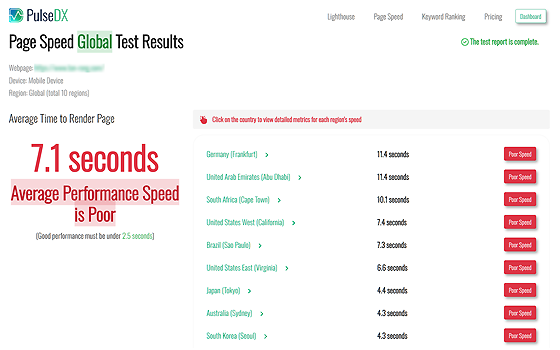
Global Overall Report
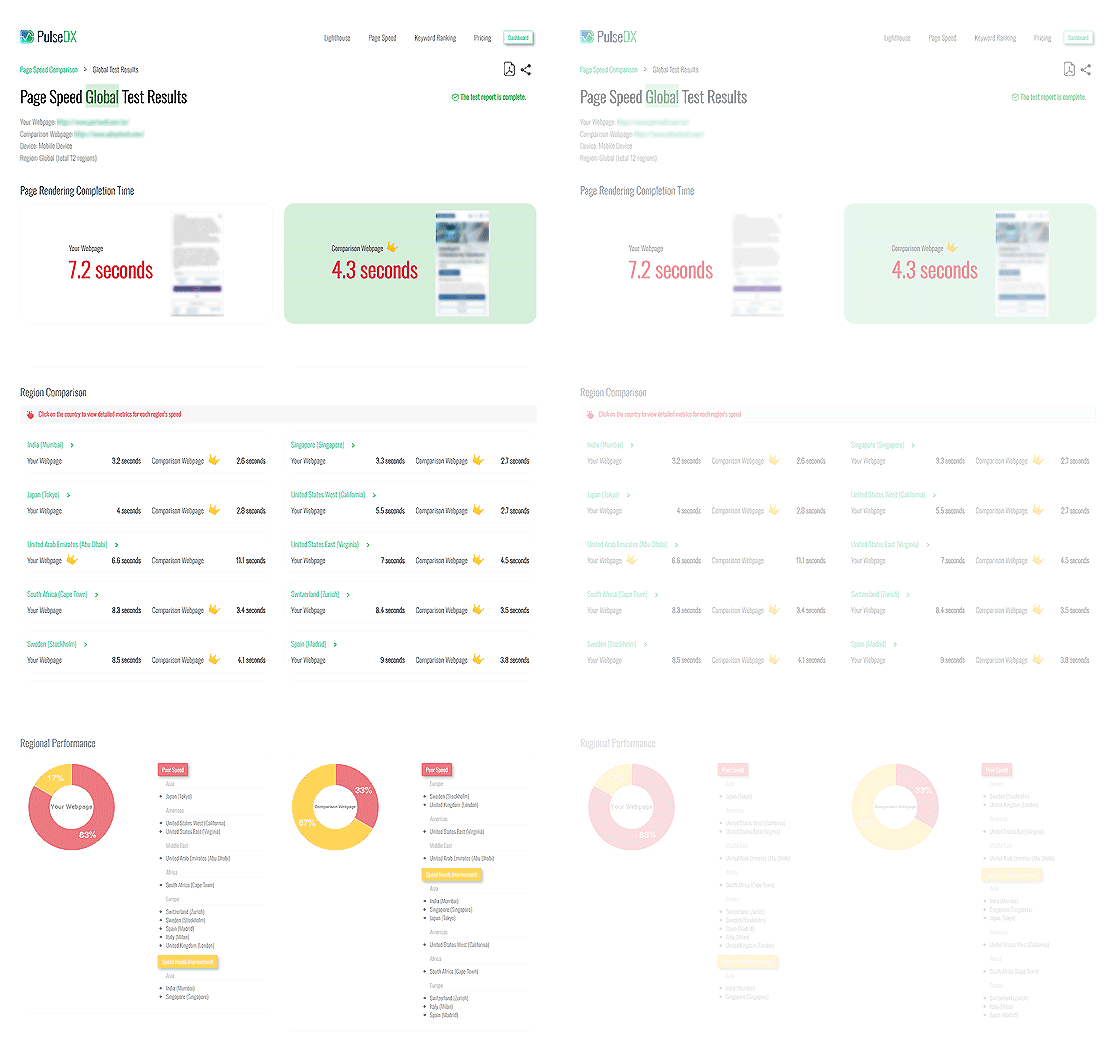
The report provides an average time for page rendering completion across all selected regions and individual average details for each country or region. Click on the region you care about most to view the complete page speed diagnostics results for that area.
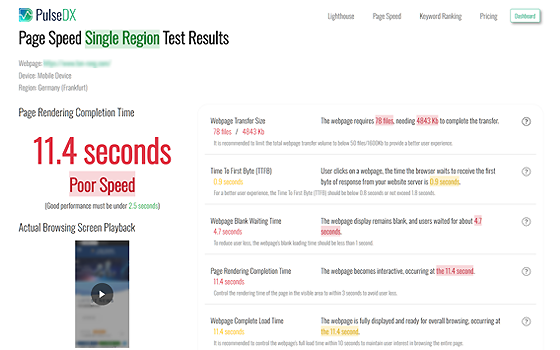
Single Region Report
The report includes key metrics such as page transfer size, Time to First Byte (TTFB), waiting time before rendering, page rendering completion time, and total page load time. You can easily see the gap between each metric and the standard, exploring which aspects need improvement to help make informed decisions for website management.
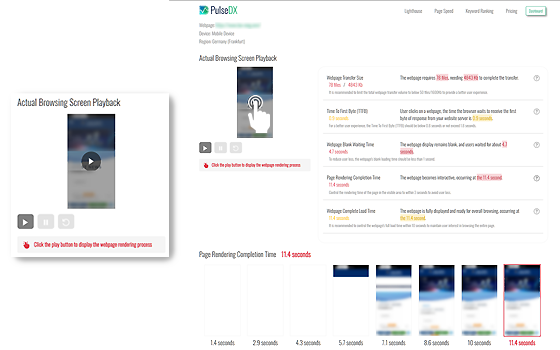
Actual Recording
Click on the page screenshot to play the real browsing video for that region, showing the time buyers wait to open the page. Focus on page rendering speed and loading smoothness to identify areas for optimization.
Competitor Comparison
The report clearly shows the differences in page loading speeds between your page and competitors pages in local regions, including actual recordings and specific metrics such as TTFB and rendering time, helping you identify competitive advantages and determine if your page performs better or worse than competitors locally.
Share Reports
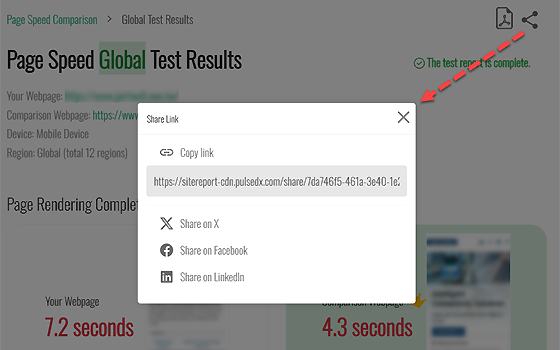
Create shareable links to provide easy access for decision-makers without requiring them to register or log in. You can also post the shareable link directly on your preferred social media platforms.
Long-term Tracking
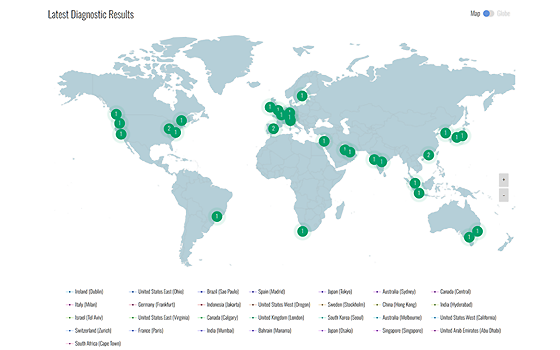
Schedule diagnostics for a webpage to regularly track changes in page speed performance in regions you care about, allowing you to understand your Website's efficiency in potential markets, reduce user churn, and enhance local SEO performance.
Pricing and Billing
Page Speed Diagnostics uses a credit-based billing model, with credits calculated according to the devices, countries/regions, and URLs tested.
- The number of credits required varies depending on the chosen devices, countries, and URLs.
- Members can subscribe to a diagnostics credit plan at any time. Accumulated credits will be deducted based on the conditions of each diagnostics session, and the fee depends on the number of credits subscribed.
- Example of Diagnostics Conditions and Credit Calculation:
- (1) Conditions: 1 device x 3 countries x 2 URLs; the system will deduct 6 credits.
- (2) Conditions: 2 devices x 5 countries x 2 URLs; the system will deduct 20 credits.
For detailed pricing, please refer to the latest pricing table here